
Logs are easy to produce and difficult to use well. Every service writes them, but inconsistent schemas, missing context and uncontrolled volume turn incident response into a search through noise.
Quick answer: Good production logs record meaningful events as structured data, use stable field names and severity levels, carry request or trace context, exclude sensitive values and follow an explicit retention policy. Centralize them so engineers can query one timeline during an incident.
This guide turns those principles into twelve practices for developers, SREs and platform teams. It covers application code first, then the collection, security and retention decisions needed to keep logs useful in production.
Logging best practices checklist
Use this as a fast reference or internal review tool before your next service ships to production.
- Define what each service should log and why.
- Use structured logs with a consistent, stable schema.
- Use log levels (DEBUG, INFO, WARN, ERROR, FATAL) correctly and consistently.
- Write clear, event-based log messages.
- Include request IDs, correlation IDs, trace IDs, and service metadata in every log.
- Never log passwords, tokens, API keys, session cookies, or personal data.
- Centralize logs from applications, infrastructure, containers, and cloud services.
- Set retention policies based on operational and compliance requirements.
- Sample or filter high-volume, low-value logs in production.
- Monitor log volume and alert on unexpected ingestion spikes.
- Correlate logs with metrics and traces for full observability.
- Choose metrics, traces or logs for alerts according to the failure being detected.
What is application logging?
Application logging records events, errors and state changes produced by running software. Log entries form a time-ordered account of what happened, when it happened and the conditions around it. Engineers use that record for debugging, monitoring, security investigations and audits.
Common types of logs
| Log Type | What It Captures |
|---|---|
| Application logs | Internal events, errors, warnings, and transactions |
| Security and audit logs | Login attempts, permission changes, access control events |
| System logs | OS-level events, kernel messages, service restarts |
| Infrastructure logs | Server, network, load balancer, and cloud service events |
| Access logs | HTTP requests, API calls, client IPs, response codes |
| Database logs | Slow queries, schema changes, connection errors |
| Kubernetes and container logs | Pod events, container stdout/stderr, scheduler events |
Most production systems produce several types at once. Their schemas and retention periods may differ, but each record still needs a clear event, reliable timestamp, severity and enough context to identify its source.
Application logging best practices govern the event at its source: what the code records and which fields it emits. Log management best practices govern what happens afterward, including collection, access, retention, search and disposal. This guide covers both without treating them as the same job.
Why logging best practices matter
Poor logging creates real operational problems. Logs that are too noisy drown out critical signals. Logs that are too sparse miss the events that matter during an incident. Logs that are unstructured are expensive to query and easy to misinterpret. Logs that include sensitive data create compliance and security risk.
Production logging best practices help teams:
- Debug faster: Structured, contextual logs reduce mean time to resolution (MTTR) during incidents.
- Monitor production effectively: Consistent log schemas support reliable dashboards and alerts.
- Strengthen security and compliance: Audit logs and redacted sensitive fields reduce exposure.
- Control storage and ingestion costs: Sampled, filtered, and tiered logs prevent runaway cost.
- Build better observability: Logs correlated with metrics and traces give a complete picture of system behavior.
- Improve data quality: Stable schemas produce cleaner dashboards, more reliable alerts and less noise.
12 logging best practices for production systems
1. Define what you need to learn from logs
Before writing a single log line, decide what your logs need to answer. Logging everything creates noisy, expensive data. Logging too little misses critical events.
Ask these questions per service:
- What events matter for debugging this service in production?
- Who will read these logs-developers, SREs, security teams, auditors?
- What can be better handled by metrics (counters, rates, gauges) or traces (request paths)?
- What compliance or audit requirements apply to this data?
Write these objectives into the service's operating documentation. They should determine which events are logged, their severity, required fields and retention class. Review the contract when the service gains a new dependency or handles a new category of data.
2. Log relevant events, not everything
Comprehensive logging matters, but indiscriminate logging creates bloat, slows down ingestion, and makes it harder to find what you need.
Good events to log:
- Failed payments, failed logins, failed authorizations
- Permission changes and access control events
- Deployment and configuration change events
- Request failures, timeouts, and retries
- External API failures and slow responses
- Queue failures and dead-letter events
- Service startup, shutdown, and health changes
Avoid:
- Noisy success logs for every routine internal step
- High-frequency health check requests that never fail
- Repeated debug-level logs running in steady-state production
- Log lines duplicated at multiple levels without adding new context
AWS recommends keeping application logs useful and actionable because excessive logging can increase processing and storage costs while hiding security events. Its application logging guidance is a useful review reference.
3. Use structured logging and a stable schema
Structured logging represents an event as named fields, usually in JSON or key-value form, rather than placing all context inside a free-text message. The schema matters as much as the encoding: the same concept should use the same field name and type across services.
The OpenTelemetry log data model separates the event body from severity, timestamps, resource attributes and trace context. Using those concepts consistently makes records easier to route and correlate across tools.
Unstructured (hard to search, alert on, or redact):
User login failed for user 123 from 10.1.2.3Structured (queryable, filterable, and alertable):
{
  "event": "user_login_failed",
  "user_id": "123",
  "ip": "10.1.2.3",
  "service": "auth",
  "environment": "production",
  "level": "warn",
  "timestamp": "2026-04-20T09:14:32Z"
}
Structured logs are easier to filter, search and redact. They also support SQL queries across large volumes when stored in columnar formats such as Apache Parquet.
Keep your schema stable. Changing field names across deployments breaks dashboards, alerts, and queries that depend on them.
4. Use log levels consistently
Log levels categorize the severity and intent of a log entry. They are only useful if every service on your team uses them the same way.
| Level | Use For | Avoid Using For |
|---|---|---|
| DEBUG | Local troubleshooting, detailed internal state | Always-on production noise |
| INFO | Important business and system events | Every internal substep |
| WARN | Recoverable issues, early risk signals | Normal expected conditions |
| ERROR | Failed operations that need attention | Minor validation failures |
| FATAL | Service-level failure or forced shutdown | Regular request-level errors |
Choose a production threshold for each service instead of applying one default everywhere. INFO may suit business events, while a high-throughput library may need WARN by default. Enable DEBUG for a bounded investigation, record who changed it and restore the normal level afterward.
5. Write meaningful event messages
A useful log message tells you what happened, where, and why it matters-without requiring the reader to open source code or trace back through system state.
Bad:
Error occurredBetter:
Payment authorization failedBest:
{
  "event": "payment_authorization_failed",
  "payment_provider": "stripe",
  "order_id": "ord_123",
  "reason": "card_declined",
  "service": "checkout",
  "level": "error",
  "timestamp": "2026-04-20T09:14:32Z"
}
Use event-based message names-nouns and verbs that describe what happened-rather than status codes or internal state descriptions. Avoid vague phrases like "something went wrong," "unexpected error," or "failed." They tell the reader nothing actionable.
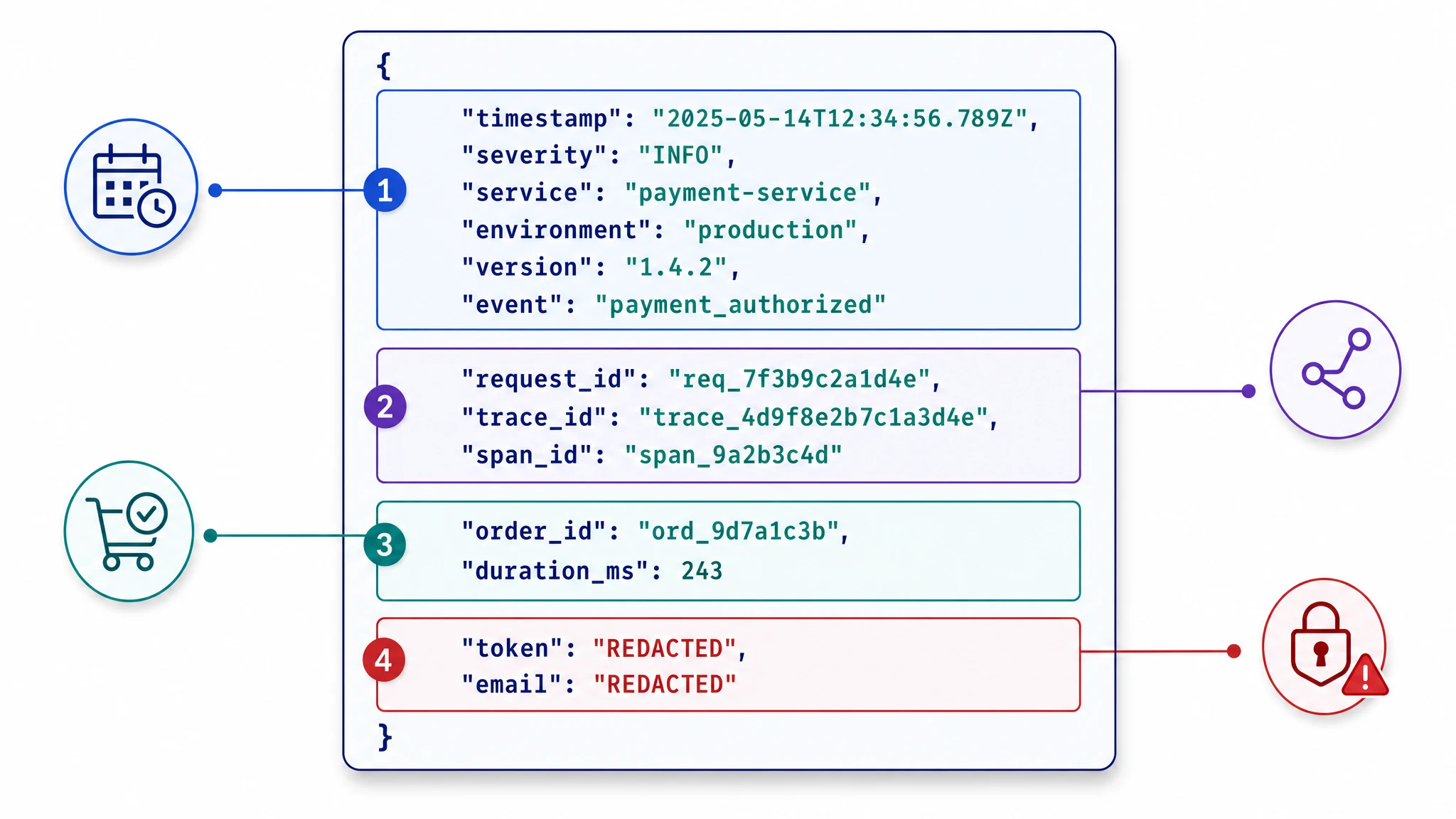
6. Add context to every log
A log entry without context is hard to act on. Every log should carry enough metadata for an engineer to understand what was happening-without switching between systems, checking deployment dashboards, or asking the person who wrote the code.
Standard contextual fields to include on every log:
service- which service generated the logenvironment- production, staging, developmentversion- application or build versionregionandhostnameorpod_namerequest_id- unique identifier for the incoming requestuser_idortenant_id- where safe and relevanttrace_idandspan_id- for observability correlationtimestamp- in UTC, ISO 8601 format
High-cardinality fields like user IDs, tenant IDs, and request IDs dramatically improve your ability to search and correlate logs in production. Use a logging middleware or framework that injects standard context automatically rather than relying on every engineer to add it by hand.
7. Propagate correlation and trace IDs
In distributed systems and microservices, a single user action may pass through dozens of services. Without a shared identifier across those hops, debugging a failure means manually stitching together log entries from multiple sources.
- Request ID: A unique identifier generated at the entry point for one request.
- Correlation ID: A broader group identifier that links related operations across multiple requests or sessions.
- Trace ID: Links logs to a distributed trace for the same request-generated by OpenTelemetry or another tracing system.
- Span ID: Links a specific log entry to one operation within a larger trace.
If your team uses OpenTelemetry, ensure that logs carry active trace and span context so engineers can navigate from a log entry directly to the full request trace during incident investigation. This connection between logs and traces is the core of logging for observability at scale.
8. Keep sensitive data out of logs
Logging sensitive data is one of the most common and costly logging security mistakes. Logs are often stored at lower access-control levels than your primary databases, may be replicated across systems, retained for years, or forwarded to third-party monitoring tools.
Never log:
- Passwords and password hashes
- API keys, access tokens, and session cookies
- Private keys and certificates
- Payment card numbers or bank account data
- Social security numbers, dates of birth, or other PII
- Raw request bodies without field-level redaction
- OAuth authorization codes
Security logging controls:
- Redact sensitive fields at the source before the log is written-not after.
- Use an allowlist approach: explicitly define what is safe to log rather than trying to block known bad values.
- Apply field-level redaction in logging middleware so it happens automatically across all services.
- Restrict access to logs that may contain sensitive operational or business data.
- Audit log access policies on a regular cadence.
Structured logging makes field-level redaction significantly easier than scanning and masking free-text messages after the fact.
The OWASP Logging Cheat Sheet provides a broader review of data exclusion, sanitization, access control, transport and verification. Treat redaction tests as part of CI rather than waiting for production data to reveal a leak.
For a concrete collector configuration, see how to remove PII at the source with the OpenTelemetry Collector.
9. Centralize logs from all services
Logs stored in isolation are difficult to use. Centralizing logs from all services, infrastructure components, and cloud resources into a single queryable platform is a core log management best practice-it makes logs correlatable, searchable, and useful for unified dashboards and alerts.
Sources to centralize:
- Application logs from all services and all environments
- Infrastructure logs from hosts, VMs, and cloud services
- Kubernetes pod events and container stdout/stderr
- API gateway and load balancer access logs
- Database slow query and error logs
- Security and audit logs
Log aggregation tools and collectors like the OpenTelemetry Collector or Fluent Bit can forward logs from all these sources into a central platform. Centralized log management also enables cross-service correlation using the request IDs and trace IDs added in earlier steps.
10. Set retention by data class
Not all logs need to be kept at the same access speed or for the same duration. A tiered log retention policy balances query performance, compliance, and storage cost.
| Tier | Example window | Use case |
|---|---|---|
| Hot | 7–30 days | Active troubleshooting, real-time alerting |
| Warm | 30–90 days | Post-incident review, trend analysis |
| Cold or archive | Policy-dependent | Audit trails, investigations, long-term records |
Set retention by log type, environment, investigation window and applicable policy rather than using one period for everything. Short-lived development logs, operational production logs and regulated audit records usually need different treatment. Confirm legal requirements with the team responsible for compliance; regulations do not share one universal retention period.
The NIST guide to computer security log management covers the wider process of building and maintaining an enterprise log-management program.
Archiving lower-value logs to object storage in compressed columnar formats like Apache Parquet keeps them accessible without keeping them expensive. Keeping everything in hot storage is the most common driver of excessive log management cost.
11. Monitor log volume and control cost
Log volume directly drives ingestion and storage cost. Without monitoring, a single misconfigured service or a stuck debug log can spike costs significantly after a deployment.
Practical steps to control log cost:
- Alert on unexpected log volume spikes, especially after deployments or configuration changes.
- Review log volume per service regularly-outliers are usually misconfigured or logging too verbosely.
- Remove or gate DEBUG logs in production unless actively investigating an issue.
- Apply sampling to high-volume, low-signal-value logs such as routine health checks or polling events.
- Separate audit and security logs from operational debug logs-they have different retention and access needs.
- Filter noisy logs at the collector level, before they reach storage, rather than storing and discarding later.
Log volume monitoring is a core part of observability cost management. Treating log ingestion as an uncontrolled resource is one of the fastest ways to exceed infrastructure budget without gaining meaningful observability.
12. Connect logs with metrics and traces
Logs explain what happened event-by-event. They are not the right tool for every monitoring and observability need.
- Metrics show aggregate trends, saturation thresholds, and rate behavior over time. Use metrics for SLO tracking, capacity planning, and rate-based alerting.
- Traces show end-to-end request paths across services. Use traces to identify latency bottlenecks and cascading failures across distributed systems.
- Logs provide the event-level detail needed to understand why something happened and exactly what state the system was in.
Choose the alert source according to the failure. Metrics work well for rates and thresholds. Traces expose latency and dependency failures. Logs are appropriate for discrete events such as an authorization failure or a job entering a dead-letter queue. Correlation lets an engineer move from the alert to the affected trace and then to the relevant logs in one investigation.
Logging best practices by environment
Different environments have different logging needs. Apply these defaults across your stack.
Development
- Use DEBUG freely-it is the right environment for verbose, detailed logging.
- Include full stack traces and detailed error messages.
- Keep log output readable in the terminal; pretty-print JSON if needed.
- Do not persist or ship development logs to shared or production systems.
- Do not let local environment variables, secrets, or credentials appear in log output.
Staging
- Mirror the production log structure so staging validates log quality, schemas and feature behavior.
- Test alert patterns against realistic log volumes before promoting to production.
- Validate that sensitive field redaction is working correctly end-to-end.
- Validate that sampling and filtering rules behave as expected before deploying.
Production
- Use the production threshold defined for the service. Enable DEBUG temporarily and with a clear plan to disable it again.
- Apply all sensitive field redaction at the source before logs are written.
- Centralize logs and enforce retention policies.
- Monitor log volume after every significant deployment.
- Correlate logs with traces and metrics for incident investigation.
- Review alert configurations regularly and reduce log-only alert patterns where metrics-based alerts are more reliable.
Logging examples: bad vs. better
Authentication Failure
Bad:
Login errorBetter:
{
  "event": "user_login_failed",
  "user_id": "usr_456",
  "reason": "invalid_password",
  "attempts": 3,
  "ip": "203.0.113.45",
  "service": "auth",
  "level": "warn",
  "timestamp": "2026-04-20T09:14:32Z"
}
External API Failure
Bad:
API call failedBetter:
{
  "event": "external_api_call_failed",
  "provider": "payment_gateway",
  "endpoint": "/v1/charge",
  "http_status": 503,
  "retry_attempt": 2,
  "order_id": "ord_789",
  "service": "checkout",
  "level": "error",
  "trace_id": "abc123def456",
  "timestamp": "2026-04-20T09:14:33Z"
}
Background Job Failure
Bad:
Job failedBetter:
{
  "event": "invoice_generation_failed",
  "job_id": "job_001",
  "tenant_id": "tenant_99",
  "reason": "database_timeout",
  "duration_ms": 5001,
  "service": "billing",
  "level": "error",
  "timestamp": "2026-04-20T09:14:34Z"
}
The pattern is consistent across all three: a stable event name, typed fields for every piece of context, no ambiguous messages, and no sensitive values.
Put these practices into operation with Parseable
Application logging ends at the point where the service emits an event. Collection, storage and investigation continue after that point. Parseable can serve as the central destination while collectors handle transport and in-flight processing.
Parseable supports this workflow through:
- OpenTelemetry ingestion for logs, metrics and traces.
- Documented integrations for collectors such as Fluent Bit and Vector.
- SQL search over structured telemetry stored in Apache Parquet on object storage.
- Dashboards and alerts for investigation and operational monitoring.
The Log Monitoring solution explains the complete workflow. If you are still selecting the collection and storage layers, compare log aggregation tools, logging tools and log management tools separately. They solve different parts of the system.
Use the checklist at the beginning of this guide during service reviews. Revisit it after incidents: if the investigation required a missing field, an undocumented event, or a manual join between systems, update the logging contract while the failure is still fresh.